Σάββατο 17 Οκτωβρίου 2015

Tecsun Q3 review


(also on my radio web page )

I m very curious why this model has a very low audience views ...


Following  the demise of the  Creative Zen due to sudden  battery drainage , i decided to look into a better and more up to date   recorder for all usages.  I found via the ebay  a slightly  used copy of it for only $5 which i ought it immediately that came  in ca 3 weeks . with little  more search  i hacve seen that the normal price of it is $25 (price of anon co )

Q3 us not so small gadget of  10 x 6 x 2 cm size , nearly the  size of a cigarette box. 
This model  is circulated with  two colours black or  white  The model i found has white colour. 


Opening its box , most of the operations lie in the right part of the  gadget . On the top youwill find only one three  position  switch, 

The positions are : OFF , MP3  , RADIO . In MP3 mode  it plays either  the mp3 collection you have already stored  in  the SD memory , (not included)  or the  recordings you already made (and stored  in the SD memory ). In RADIO mode it is a FM only radio player


The front panel include  green LED panel with the standard operations . ON the right  there are two very small buttons for the audio folders : music folder & voice folder
It is better to describe here how the  files are shown in the  LED

- IN mp3 file mode (music folder )the player reads the  files in unsorted mode starting from the fist file  is copied from the computer and starting from  the main   MP3 directory and a serial number (counter ) is shown in the LED screen .   If there are  files in directories  it reads them  sorted (?) with counter;s number to follow (ie of the main dir  has 15 fMP3 songs  the next number  starting with the  subdirectories will be 16 not 1  )
- In voice mode (voice folder ) , the player shows the corresponding serial  recording .Once you look into your computer , the files  have a  letter in the end as like 15M meaning it is recorded from microphone , 16 L  ie line recording , and 17R or 17F  ie from radio

Under the LED panel there are three buttons : REC  for recording  a STOP  button and a REPEAT  play button all these are self explaining
There  is a numeral keypad with a  repeat button and enter . This keypad  works for the  frequency setting , the mp3 or REC file setting
There are  three more buttons on the right edge of the  front panel : Next or fast forward / pause or play / previous of reverse that applies  to the recordings and  to radio mode .


Now on the  right part of the player
-A USB  socket  written as  computer audio input . did nt try if this can also transfer  audio , but all this time (at 3 months ) used it mainly to charge its battery. The computer to Q3 transfer speed is  very low . 
-A line in 3.1 mm  socket and provided  cable  abt  25 cm .
-An ear  out 3.1mm socket .
-Volume control , with analog  resistor. Audio is quite high in all modes as radio , as mp3 player and also as radio  recorder  but many times  the audio in very low  levels  is prone to turn on the one speaker  (either on the left or the right  depending n how you put the earphones into your ears)


IN the bottom   there is a Sd memory card slot. I put a old 8 GB memory


A few notices  on the  operation of the gadget:

- Radio ; it is  only  FM radio . You cannot scan  the  band without making the radio auto-store all frequencies (ATS) which is bad for me unless i start  delete more han  55 out of 65  stations in my  place . Therefore i prefer to enter the frequency via the keyboard.  Its audio  is relatively bassy  , and lacks stereo   spatiality comparing to all other radios i use. meaning all stereo stations are heard  in between   mono- and stereo-phonic .Audio is good though  bassier than  other radios (1126  and 380) and once recorded shows the same quality.

-Recording  : Line in is activated once you plug the cable onto the socket and surpasses the radio or mp3 operation . Tested with PL880 , 380 and once via an old unused journalist recorder unit with  a really replica quality. This  journalist recorder  is not supported by Windows 7
I cannot find where is the inbuilt  microphone .  The quality is good and has been used to  record a seminar of ca 70 minutes  which was  the lengthiest of my recordings. The best to get out for audio quality from seminars is to use it on a steady place far from your clothes.

I did a crazy experiment  with it connecting it to my tablet. The tablet   was connected on the main via its wall adaptor. Q3 was connected to the tablet  in two ways : USB to USB cable for charging it and  the audio cable to record from a streaming radio.  Audio was  very good but i preferred not to use it for a long time should any  damage caused to one of them . The seller advised me to use  separate power adaptors  for each. 
Everything  is recorded with 128kb MP3 /22 KHz as standard . 22kHz  is bad selection.  Though  very good audio for my ears , it is inapropriate for commercial works such as  recording from tapes or vinyl discs.  This was the reason  i bought it but for the price  i feel very hapy .
And the last thing to notice. Any  recordings are time separated to 1 hr files. If your recording is longer than 1 hr the player will stop and immediately continue  recording under  a new file . Neither good nor bad but  i have not tested it so far to see if something has been cut  . 

-Mp3 : i have tested  it with my favorite  (Crypto )Muvi 18 mp3 player  and found really no difference in the audio quality , and used my Sennheiser open  ear headphones. Both have an excellent  audio  with crisp trebles even Muvi uses  slightly more  treble than other  Japanese models(say Sansa)  . That means  an excellent audio quality. most  reviewers in Amazon  say the same.

The Q3 plays not only MP3  but also WAV  and WMA  files. have not tested  WAV  but WMAs follow  the quality  of Muvi. 

Battery : Q3 uses battery model BL-5B Nokia type which was not included in the package. i found one  from ebay for ca 3 $  and is nearly the same charger  as of my mobile's (Nokia 6300) dimensions though a big smaller. Opening  the battery cover  is a bit  hard.  for one  time i charged it with a wall battery charger that supported BL4 , BL5 and BL5B  ie all battery formats i use for my Degen 1126 , mobile and Q3 , till  the charger reached its life after 200 uses in less than  1 year . Drained  BL5B required  abt 3 hours  to be charged  in full via the battery charger , but it was a problem with it since the charger  became hot with only this battery and I dont know why. Nearly the same  happens by charging the battery via the a power adapter . the power adapter becomes very hot  too.

About 7-8  hours  of recordings is  required to  drain the battery.

Rating  9/10


Κυριακή 28 Σεπτεμβρίου 2014

Δευτέρα 8 Σεπτεμβρίου 2014

The replacement tablet ETB 9543


Please look and  buy my book Malaysia 25 years research   http://goo.gl/Pi87gp   . As unmployed by buying this book you can support my family with the neesary income!


Following the collapse of the  previous tablet ETB 9541  , the company replaced it with this new , numbered ETB 9543


This is the box of the new tablet . It has been given after the technician realized that mine was totally off and nor  could be started from its android logo or sticks to it then froze

Just a few pics of  the tablet


 This is  the front view


The rear  view . ON the left edge is the reset function


The sockets in its right part tht includes , charging , USB , SD card , mic , and ears .
and inside the box are the power adaptor , the cable adaptor and the guides

ON the start instead of the ANDROID  logo only the copany's logo is shown for ca 15 secs :


and the screen is shown this way ;(shortcuts in the iside screen , in the outer part with the basic ie settings , programs , browser , photos )


IN this  article i will shows only the most interesting , and funny things upon its use :


  • Weird thing: its provided power adaptor interferes  with the thumb usage: It is good that i kept the older tablet's  adapter that does not interfere   with the touch screen Even with the newer 7"  adaptor there is not any problem
  • Different operation design :task-bar is  shown in horizontal , instead the vertical line task icons as shown above 
  • Operating system Android 4.2.2.
  • Shut down : shut down asks for  hibernating  or shut down 
  • In just  2 minute of no operation the tablet gets nto sleep mode (this is the default of it though it can be adjusted from the settings mode )
  • Chrome and internal browser (though Chrome based ) are available in this  tablet. There is a special 'request  desktop mode' option in build in browser . This inner browser can be hidden  leaving all space only for watching the  web page.Chrome as standby program has a  rather strange behaviour  with its inside zoomer hat makes it sometime to zoom not only  the page but  zoom the screen  so that you cant workk it properly unless you minimize it
  • '1 mobile' market is the  free replacement of Slide share (program market) this also offers  update facility.There is a nag screen on  start-up  menu at the right bottom of the screen
  • MX player available . it can sometimes freeze esp if you want to fast forward(whie watching online movies )
  • 'Prt screen'  (when using physical keyboard )does  not  operate 
  • Weird screen watching : you ned to tilt the tablet by 15  degs upwards (in lateral use) to watch the whole screen !Very good if you do not want someone to look into your screen esp if he is in the left of you !May i suppose it is LCD?
  • Audio is very huge . Huge and very sharp (read :trebly ). The volume level 3 in this tablet  corresponds to 12 in the previous) Tested with the new for my daughter (report later ) had the same  audio quality and can also work in sleep mode AAC+ is also supported. 
  • Two problems with the   audio : changing program  , but also during the MX player audio is muted by itself . The second though minimal is that AAC  operation causes some 'trickling' sounds esp in strong basses 
  • Hibernation is very good for radio listening keeping the battery to very low without burning
  • Seems draining  faster the battery if video is used than its predecessor . IN other modes as eg text browsing as in reader battery drainage  is abt 2% per minute In case is used offline only for text reading (as for example pdf reading )o sometimes even writing to text  to Evernote applet (special for writing notes etc )the battery drains even lower . About 2-3 % per 1 hr Even less in case lower luminance is used , it can dain battery for more than 2 hrs per 2 % Same applies also to watching offline video. But in the levels of 80-70 %  the battery drops faster , even if is used totally offline All offline operations  keep the tablet cool.   This is what i could call idling 
  • And more asd the time passes : After 1.5 year of use  for abt 8 hours a day i ve sen  some irritation of the screen after 4 hrs at lat of usage that day
  • A very good program tested is UC browser  .it can cover all your needs

  • 1.5 year after  and about 3500  hours of operation  the following symptoms seems to describe  tablet's  end of life : 

  • -Instability of WiFi :afer less than half hour of WiFi connectivity  , it starts  suspend to  and commence  its connectivity 
  • -Instability of charging . It happened once but while battery  charges very slowly it drains very fast THis happened after an accident that i dont remember . That time  the screen seemed  as software broken due to a maloperationn . Then the battery  started  draining very fast  ie 5% per minute from the standard of t of ca 1.5-2% per minute .I used to be very careful in operiting it 
  • -requires internet  to synchronize its  clock !!!

Therefore  the  tablet  works for he moment very well  and if used offline with internal material (pdfs videos etc )its battery can last much longer than online . Nice feature !
4/5 


Δευτέρα 14 Απριλίου 2014

Zen V : now the player works!

Following the  negative  review in a previous post, i suspected  that the  problem was from the battery / I  did a search and bought  one new battery  via the ebay.  The battery costed  me abt 12 Euros !
I tried  to open the case but it was  quit tricky to me . dfo this reason  i given it to a tecjnicain to do the 'dirty job' IN just 2 minutes he opened the player unscrew  a screw and  change the battery . And Player is now working properly. 

Now the  player after the welcome screen  it shows a menu this way:


At fist i thought that the  red cycle  was the navigation knob. but could nt  do anything... readin a bit in the user's guide  the navigation  is amde from the  middle button that worls as joystick
 The menu consists  of the music library , recordings , the just playing  photos (ie very small sizes , some extras  and  system settings )

Teh recordings menu shows all recordings . microphone and inline recs / for all  files as  well as the tansfered files  the screen shows  the filename as scrolled . Pressing the joystick  for several seconds i shows a quick menu for adding  the file to playlist 


Now playing  shwos the current  and the previous  song 
Photos  shows the directory  in  a form as of Windows 7 
Extrasmenu include  date/time  MIc rec  Line in rec Organizer (calendar tasks contacts )propviding that you alerady have installed  the  provided CD in the packing

The  player is recognized as a portable device . not as a removable disk.More on the end of this article


Settings:  for audio - including level limitation  , player  settings (serial random play , one dir all dirs  etc ) clock  settings (adjsut time and date) -  , language (abt 15  including tai chinese  etc )and reset  to default 

Audio settings :  play mode (serial , random , repeat , 9  equalizer modes  and volume smart or excess compression )


 Here is how a file is played. Special additions  are available  wth prolongd push on  button as  add to  favs , add to playlists etc


Recording 
Recording is  the  main reason i bought this player .  Not only for  shortwave  logs but also for recording audio tapes , vinyls  etc 
This is the reason that this part is more dedicated . I very sparingly use it for playback


Here is a photo during recording. recording is made by pressing the REC button  int he right part of the player  .In contast to  Nano plus  , Zen V has the ability  to adjust the earphone level during recording 
Tere are 3 ways to use it  for recording 
1. use the special  button  at  the middle of right side of the palyer 
2. naviagate from the extras  menu 
3. from the quick menu 

The quick menu shows : 


In silent mode (is when is not recording ) you can also make  these ajustmensts : 
  • start  recording
  • delete recording
  • review 
  • ---
  • bitrate     [WMA only  128 and 160 ]
  • synch    [That means once the player finds audio gaps to immediately  stop this is achieved by pressing for more than  2 secs the  back button (bottom  right ) ]

Maximum recording time is 10 hours (still wondering if that means  ).If part of the memory is filled with files it shows  the remain  recording  time

I have bought this player only for this  reason . I think that its memory is quite small. Nevertheless 900 MB are  enough for making recordings  up to 980 minutes
Testing  recording differences  between V and  Nano : As noticed in my  audio  test  site on ipernity severeal people  found that V has a bassier   and  richer audio than  Plus 

And a  few  more on the  generated files: 
In contast to Creative  Zen Plus (PLus files are generated as in series ie ENC001  etc  ) the  files have the format LINE-2014-04-13 17h10m14s  .wma  ie showing date and time the file is saved

Audio : Creative was the leader  on computer audio systems . Therefore their fidelity is surely the best  among computer audio equipment  . The same applies to this player . Using the tracks provided with the player the sound is superb . I have tested  with the Sennheiser headphones which  have the flatter audio  response among my headphones. The highest possible level is still not very strong with these headphones


Comparison  with Zen Nano: Using the Sennheiser  headphones  ,the sound is nearly the same with V being a  little  bassier . I used the audio files  provided in  V for this test  

Computer connectivity: 
Instead of being recognized asa typical  external media storage it has  the format of a device as  printer or external device .. 
The player can be synchronized with the computer's media player . Drag  and drop can work only for  file transfer from and to computer  but cannot  be directly applauded to any site via the browser. The files  have fist to  be transferred to computer and then posted ! 
I found that in Win XP  the files have registry format numbers etc  that means as a peculiar  string format esp the directories  produced  by the install shield or any other  installation proram in the  /temp directory 
Once i have changed a  recorded file via computer but the player still shown the recorded name ! 


MY verdict: 4/5
Zen V is an excellent recorder and player with  a rich sound. The only awkward  is with the connectivity and bevhaviour of its files ...


Τρίτη 11 Φεβρουαρίου 2014

Πέμπτη 6 Φεβρουαρίου 2014

Cretive Zen V - a review for a bad purhcase

A very bad order for a gadget that  never worked!

As you many know me i use a Creative  Zen nano Plus mp3 as audio encoder. Several  weeks  ago I did  a tidy up on my house  for settling part of my gadgets (notice that they are too many ! ) and put my Zen in a place.Suddenly  wishing to use  it again for recording a  radio signal , I forgot where I put  it.
I was  terribly upset . For more than than 2 hours for searching  but still didn’t find anything .
This  made  me fell that I lost it . and under some bad feeling  I did a googled into Internet  for looking a cheap solution . Finally  I  found a model  very close  to it namely Creative Zen V but did n't check that the  model  does not use standard AAA batteries as mine ….
And finally  I bought it . The cost of the player is  ca $40  plus $20 (too much ) for shipping  from somewhere I cold nt identify.

AS always I check the exact  date when I received the model . It  was  11  days after  the purchase  and the seller was  from USA (notifying the full amount in the mini parcel  ie 45 + 25 )  To my impression  I saw that there   was not  any problem  with  clearance ie duties etc ! (so that seems such of low cost amounts pass  without any duties)

Two days after , I found my Zen Nano Plus inside a locker and surely  was very happy with it .

The new mp3 player /recorder has been  received in a  very dense  packing . Its case was inside a  standard UPS box which was inside a foam based A4  envelope !


The case unfolds from the middle showing two paper wings too


Inside it there is a bundle of many  l leaflets  Cd and the player which is inside a plastic case too many documents and a niec bag for traveling


 I had to use a scissors  in order to remove the player and its accessories

And here is a photo with the  player and the accessories  namely : a USB  cable , a holder , earphones  and adaptor cable . Upps !  I now have a new adaptor  cable for making my recordings  , yuppie !


As you  many see the  player is quite think and surely out fashioned. Several reviews sown that the model was produced on 2006   And just 1 GB ! But I was not so much interested  for its size as it could be only used for recoding  from external sources  rather  than  as a standard  player [though audio quality is the best as  read somewhere ]And neither was annoyed that the model  could record only WMA  on160  kb (thus  of better  fidelity than a standard 96- 128-160 kb  MP3 as my zen records ...) Thi is wring as after reading the users  guide , you can always change the recording  bitrate

And here is a description of the  remain  documents:
1. a mini leaflet for not listening  very loud (care for your ears )
2. a fill your zen  pamphlet -  adverts for relative  material
3.  a leaf in more tan 20 languages on how to unlock the  audio
4. a leaf for charging via USB
5. service extension
6. an instructions  guide
7 acessories for zen  that include: colored earphones , leather pouch , speakers, silicon skin , armband , bloototh heads , tune cast ii transmitter, car charger and several other
8. As per users guide  the Zen  requires the drivers and softwar in ordeer to be comnnected toa computer (nor Xr neither 7 can  recognize it ....)


Here is a photo of the player itself


There are button for playback pause , arrow buttons , enter button as well as two others

Here is the  RECbutton as well the volume button . These are in the right side of the player


And here is the left side of the player. On /off /lock functions and the  reset button


And here is the upper side . from the left to the right are : USB socket , heads (the standard 1/8" SOCKET ) , line in (very thin plug ) and mic

I immediately  tried to check for connectivity … Using this USB cable which is  rather short from the front USB socket on the bottom of the computer to computer’s top I found that the player only was  blinking …. Huh what s happening? The  computer did t recognize it still….I thought that  if I first have to charge it and  then try to look what s happening

To my astonishment in the house 2 hours later  , on the start it behaved the same : the buttons of the player were blinking for several times . And after some time it shown to start showing the logo , just entering into menu  and immediately showing a message  of low battery ....


.I already have uploaded a  video  on my page in youtube http://youtu.be/W3W7kPTwO8c that  is also included here


I suppose the battery is dead. and cant be  restored .

Anyway  the player was a very  bad selection on a  bad time and a bad mood. This is gthe only exception of the set system  The cable line in adaptor  is OK for the use of my older Zen model as spare material

The earphones are not so good comparing to other ears i use . They are very bassy (bass seems pitched up) with lower trebles than other models . AS for example the AKG 908 offer more more normalized frequency response

I feel very pity  to spend a rather much money  (abt 55 Euros ?) for this gadget that does not work so far . ONw idea is to send it back?

Later two weeks after; with little  search in ebay i fond and bought a battery from UK for replacement and awaiting the response of the seller


More upon receiving it...

Δευτέρα 3 Ιουνίου 2013

Silvercrest SKD 1000A3 casete converter presentation

This is a  cassette player and converter  that just passed  my hands and returned back to the shop  bought it Lidl at a price of 22.5 euros ....


As you know  Lidl chain of supermarkets  every week  they offer news series  of products that are recycled  every half a year. Same happens to this nice and tiny cassette converter . Hoping that this small gadget could fulfill my interests in converting several cassettes  I bought it with  the hope that it could fulfill my interests : including a internal memory so that  recording  could be off computer . It was  a specification  not noticed in the box , so it was  the only reason  i boght to check into the users guide

Anyway i made a  very short check  very carefully  without opening any plastic paking in case i cold return it back.


Just opening its box the  following items were included:
A guide (easily unpacked from its wraper )  , the player , a USB cable , earphones  two batteries and a CD called Audiolava  that  is the  real time  converter
Unfortunately  no information was available for  internal  memory ! that means the  converter can only  convert on trhe fly with  computer via the USB ... Gosh  , it was  not my intention ... so is the reason to return it back...


The casete player can be easily removed from its foam wrapper  by carefully detaching the scotch tape


This is the picture of the  player with the cover closed .....


and  here witrh the cover open!


and here with a  tape for minimal test


Here are all the playback control buttons . ON top are the  direction button , playback , FF (fast forward), REW  rewind , the playback button and the  stop button

and aboveare the controls  for volume , USB   earphone and eject


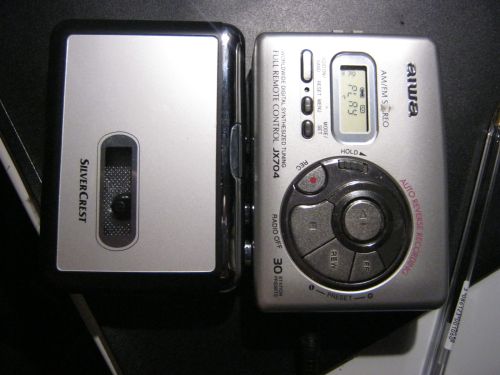
and here is  how compares with  my Aiwa  tape player


For the sake of the  review i did a  very short  audio test by installing  two batteries from my collection and  used a company tape  (original commercial  recording  )

The SKD  required  at least two times press PLAY  so that it can start play . Otherwise ti seemed  as 'dead'!

Sound: sound is great ! (used  the Sennheiser  earphones  for the best possible audio ) and compares with the also great audio  from Aiwa with little more higher tones.

As Aiwa is quite old (13 years after  the purchase) that possibly means that the  speed is somehow  slower than the nominal. Checking the  speed pf Silvercrest over Aiwa , foe at about one 'hash' over (Mi note shifts  to Fa  in silvercrest )

While changing  direction on Silvercrest and  changing tape,  the direction  remains the same . That means  if the   tape is played in the  reverse (the B side  while the normal side is in A )and you change the tape  , the  tape is played on the reverse  side !

Maximum volume is relatively  low. compared  to Aiwa's  at least 25 db !  Its sound is still comfortable  with the Sennheiser   earphones

If  the player  had an internal  memory  i could keep it . Otherwise  it is very good  though with relativity  low though  sufficient volume.